-
Dynamic Island For Any Android | Opensource
Dynamic Island For Any Android Now available on F-droid
Click here to get the F-droid version
We finally have an opensource Android application for dynamic Island and it’s working very well. The applications for dynamic Island that are available on Google PlayStore are not opensource so they are different from this application.
Let’s take a look at how to download this application and how this application works in Android.
How to Download?
You can download this application from two different sources. One is directly from GitHub, you just download the apk file and install it in your device.Now, If you are using any opensource application store like f-droid, you have to activate an opensource repository called izzyondroid because right now! you won’t find this application directly on f-droid. It might be released on f-droid later but right now this application is available on izzyondroid only.
How to add izzyondroid repository to f-droid ?
It’s a 2 step process.
Step number 1 is to search and open izzyondroid using your Android browser. Now after you open this izzyondroid website, you need to copy the repository link that will be present on the top of the page. I’ll also place the repository link here, you can simply copy it.IzzyOnDroid Repo: https://apt.izzysoft.de/fdroid/repo
Step number 2 is to open F-Droid, go to settings, then tap on add repository and paste the copied link here.
Now izzyondroid will be activated and you just need to update f-droid to get the applications from this repository.
The application for dynamic Island is known as smart edge, so you can simply search smart edge and it should pop-up in the search results. You can go ahead and download this application in your android phone.
Application Permissions
Before you start using this application in your Android device, you need to give some important permissions like the notification access and the audio recording permissions.
And you also have to enable this application from the device accessibility menu.
All these steps are important to make this application work properly.
Once you are done with all these permissions, you should be able to use the application without any issues.
In App Customization
After giving all the permissions, you can customize this application as per your requirements because some devices have the punchhole camera on the left or right and it would look wierd if there are two puncholes on the display.
Smart edge offers you an option to align this dynamic Island so you can keep it right below the punchole camera which is going to look much better. You can also adjust the hight and width of this dynamic Island depending on the size of punchole or depending on your preference.
One you have done that, you would be able to enjoy the beautiful dynamic Island under the punchole camera. You can also use options like long press which is going to help you access any application easily.
You will also receive notifications through this application and the notification icons will be displayed as well
For music players, you will get the normal album art on one side and the visualizer on the other side which looks pretty good actually.
This application is still in its early acces so you might encounter some bugs here and there but other than that, you should not face any major issues and we just have to wait for some more updates to so that it starts working properly.Android 13 Permission Issues
If you are using Android 13, you might face some issues because of the restricted permissions. Please follow the below steps to overcome this problem.
You can simply go to device settings – Apps – All Apps – Smart Edge – Enable restricted permissions from the menu (on the top right corner). Then, you should be good to go.
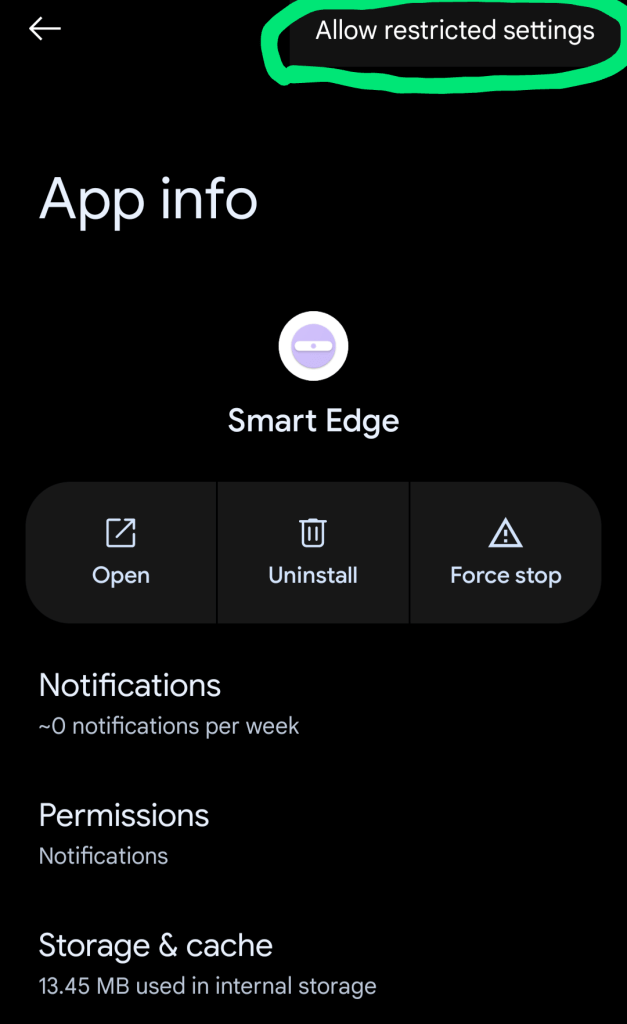
Restricted Settings in Android 13 That’s all about Dynamic Island for Android and how to make it work in Android.
My YouTube video on Dynamic Island (Smart Edge)
-
5 Amazing Android Apps on F-Droid: Opensource | July 2022
This post is about some of the best open-source applications for Android. Well, open-source apps offer much better privacy than non-opensource apps and they have very few or no trackers giving you complete control on your device. Below is a list of 5 Amazing opensource apps that you can download from F-Droid. Interestingly, all these apps are available on Google PlayStore as well.
Best F-Droid Apps | July 2022 1. Delta Chat: This application lets you chat over email making it very easy to communicate and it is compatible with Gmail, Outlook as well as other email providers.
The main highlights of this application include end-to-end encryption, a fast communication process, clean and elegant design and it is completely safe and open-source. One incredible feature in this application is that it’ll show you the messages from known users only, so you will definitely get a clean look without any spam.F-Droid Link: https://f-droid.org/packages/com.b44t.messenger/
2. PDF Converter: This is definitely one of the best applications to play around pdf files. You can convert images to pdf, text to pdf, excel to pdf, merge pdf, split pdf, well there’s a lot more you can do with the pdf files here.
You can also add or remove passwords, add a watermark or remove duplicate pages which are some really good features.
F-Droid Link: https://f-droid.org/en/packages/swati4star.createpdf/
3. Scrambled Exif: An interesting open-source application indeed. So when you take any picture using your phone camera, it captures most of the information like the location where the photo is taken, if you have provided the location access. It also captures other information like the device model and name, focal length, exposure, aperture and ISO, all this comes under exif data.
So if you share your photo on social media or send it to someone else, all this personal information might be shared as well. That is where scrambled exif comes into picture. It helps in removing the exif data from your image so that you can share it without any concern.
F-Droid Link: https://f-droid.org/en/packages/com.jarsilio.android.scrambledeggsif/
4. Organic Maps: If you are looking for an alternative to Google maps, organic maps is the one you should be looking for. This application works offline, it’s free, open-source and has no trackers making it a great alternative to Google maps.
This application does not collect your data and provides you a neat and a clean interface to browse your favourite locations.You get all the important features like searching for your favourite location or checking any hotel, bank, pharmacy, all at your fingertips. Dark theme is supported as well which looks much better on Amoled screens.
F-Droid Link: https://f-droid.org/en/packages/app.organicmaps/
5. LinkHub: When you are visiting any website and you want to save it, there are many ways to do it but linkhub is an amazing opensource application which allows you to save your links in a very organized manner.
You can create folders with names and multiple colors or create Links with title, subtitle, url and all these links and the Folders are sorted depending on your usage
There is a Swipe to delete function along with undo option and you can also Import and Export the data in JSON FormatIf you are visiting any website and you want to save it, you can simply select the website and share it through linkhub and it’ll automatically create a title, subtitle and the url.
F-Droid Link: https://f-droid.org/en/packages/com.amrdeveloper.linkhub/
Well, that’s all about some of the best open-source apps available on F-Droid and i hope you enjoyed this post. You can watch my YouTube video on the above mentioned apps from the link below.
-
5 Amazing and Minimal Android Launchers 2022
If you are looking for some minimal Android launchers to improve your productivity, below is a list of 5 Amazing Launchers that can help you with that.
YouTube Video
5 Amazing & Minimal Android Launchers 2. Kvaesitso
3. AUG Launcher
5. HEX Launcher
If you enjoy my work, do consider subscribing to my YouTube channel by clicking the button below.
-
Neo Launcher: The Best Opensource Launcher For Android
Looking for the best 3rd party launcher for your Android? Neo Launcher is one of the best opensource launchers available right now with some great customization.
This launcher supports icon packs, has some unique features like homescreen dash, desktop feed support and much more.
Below are the links to all the important files.
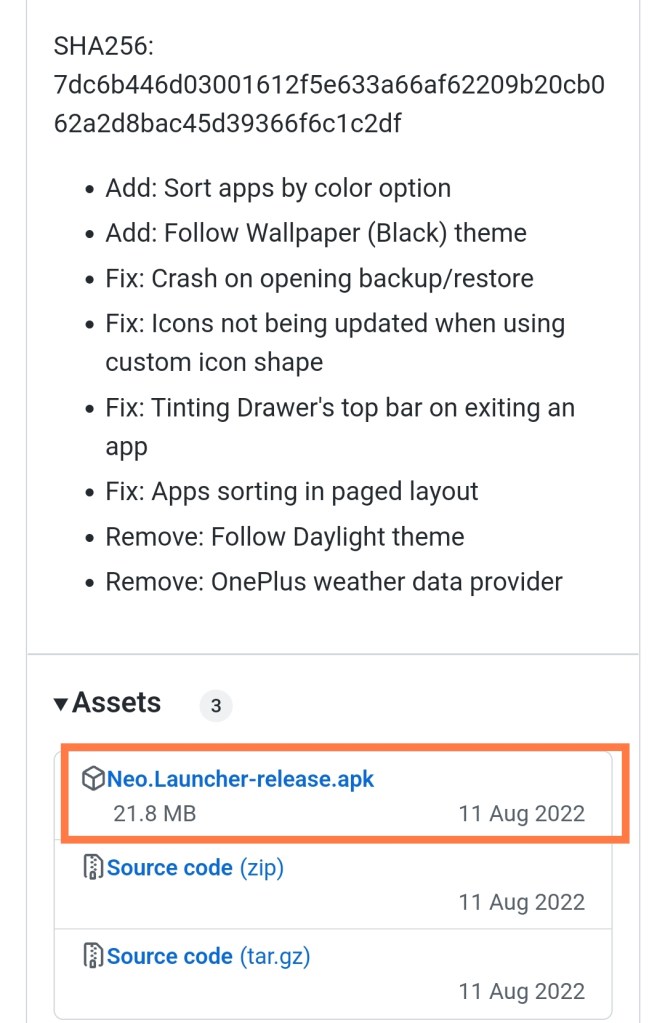
Screenshot (Apk file for Neo Launcher) Neo Feed is like Google feed that you need to enable in Neo Launcher settings.
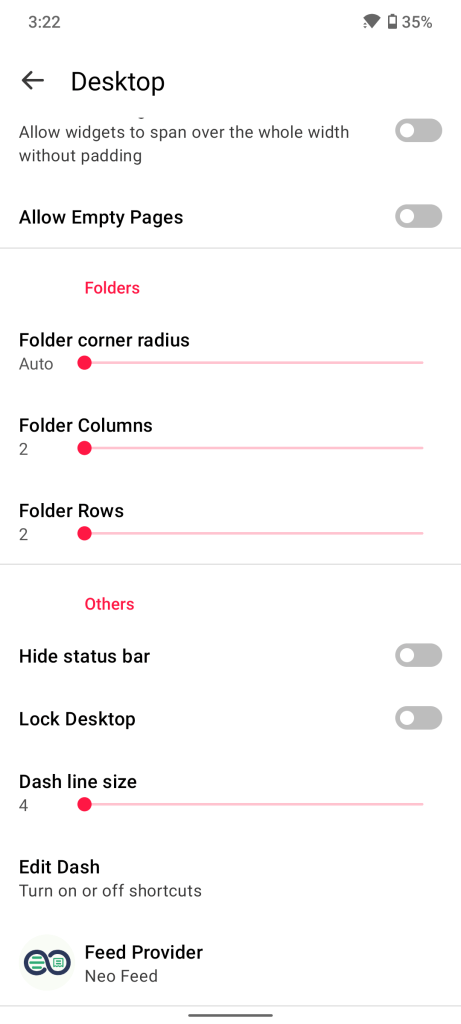
Enable Neo Feed in Desktop Settings 3. How to add news to Neo Feed?
Open Neo Feed
Go to settings
Go to data sources
Add any RSS feed, for Google feed, enter this link mentioned below
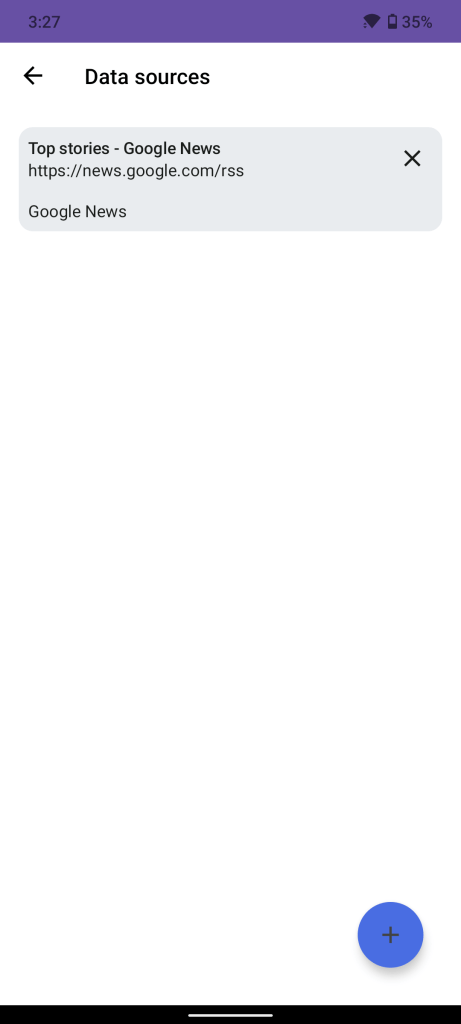
Adding RSS feeds to Neo Feed That’s all about Neo Launcher and how to make the best out of it. Do reach out in case you have any queries and don’t forget to subscribe to my YouTube channel by clicking the button below.
My YouTube video on Neo Launcher

About Me
The sky is not completely dark at night. Were the sky absolutely dark, one would not be able to see the silhouette of an object against the sky.
Follow Me On
Subscribe To My Newsletter
Subscribe for new travel stories and exclusive content.
 TechDoc Blog