-
Samsung Bloatware List
Below is the list of all the possible bloatware present in Samsung devices, you do not have to delete everything but you can try deleting the apps you don’t normally use.
Samsung Bixby Bloatware
- samsung.android.bixby.wakeup
- samsung.android.app.spage | Bixby homepage launcher
- samsung.android.app.routines | Bixby Routines
- samsung.android.bixby.service | Bixby features
- samsung.android.visionintelligence | Bixby Vision
- samsung.android.bixby.agent | Bixby Voice
- samsung.android.bixby.agent.dummy | Bixby debug app
- samsung.android.bixbyvision.framework | Bixby Vision
ANT+ Service Apps
- dsi.ant.sample.acquirechannels
- dsi.ant.service.socket
- dsi.ant.server (sensitive: may cause boot loop on some devices)
- dsi.ant.plugins.antplus
Samsung General System Bloatware
- samsung.android.messaging | Message app
- sec.android.easyonehand | One hand mode
- samsung.android.drivelink.stub | Samsung Car Mode
- sec.android.widgetapp.samsungapps | Homescreen widget
- sec.android.app.sbrowser | Samsung Internet
- samsung.android.mateagent | Galaxy Friends
- sec.android.easyMover.Agent | Samsung Smart Switch
- samsung.android.app.watchmanagerstub | Galaxy Watch
- sec.android.daemonapp | Samsung Weather
- samsung.android.app.social | What’s New
- samsung.ecomm.global | Samsung Shop
- sec.android.app.voicenote | Voice Recorder
- samsung.android.oneconnect | Smart Things
- samsung.android.voc | Samsung Members
- sec.android.app.popupcalculator | Samsung Calculator
- sec.android.splitsound | Samsung Split Sound Service
- mobeam.barcodeService | Barcode scanner
- samsung.android.app.dressroom | Samsung Wallpapers
- samsung.android.scloud | Samsung Cloud
- samsung.android.sdk.handwriting | Galaxy Note series bloat
- samsung.android.sdk.professionalaudio.utility.jammonitor
- samsung.android.universalswitch | Mobile Universal Switch
- samsung.android.visioncloudagent | VisionCloudAgent
- samsung.android.visionintelligence | Bixby Vision
- samsung.android.widgetapp.yahooedge.finance | Finance widget
- samsung.android.widgetapp.yahooedge.sport | Sports widget
- samsung.app.highlightplayer | Samsung Story Video Editor
- samsung.safetyinformation | Saftey Information
- samsung.storyservice | Samsung StoryService (Tracks device activity)
- samsung.android.service.aircommand | Air command (Note series bloat)
- samsung.android.app.aodservice | Always on Display
- sec.android.app.dexonpc | Samsung Dex
- samsung.android.ardrawing | AR Doodle
- samsung.android.svoiceime | Samsung Voice Input
- samsung.android.beaconmanager | User tracking app (sensitive)
- samsung.android.email.provider | Samsung Email
- wsomacp | Samsung Email
Samsung Pay and Pass
- samsung.android.samsungpassautofill | Samsung Auto fill
- samsung.android.authfw | Samsung Authentication
- samsung.android.samsungpass | Samsung Pass
- samsung.android.spay | Samsung Pay (sensitive)
- samsung.android.spayfw | Samsung Pay Framework (sensitive)
Samsung Printing Service Components
- android.bips
- google.android.printservice.recommendation
- android.printspooler
Samsung Recreational Bloatware
- boxer.app | Flipboard app
- samsung.android.wellbeing | Digital wellbeing
- samsung.android.da.daagent | Dual Messenger
- samsung.android.service.livedrawing | Live Message (Note series bloat)
Samsung AR Emoji
- samsung.android.aremoji | AR Emoji
- sec.android.mimage.avatarstickers | Stickers for AR Emoji app
- samsung.android.emojiupdater | Emoji updater
Samsung Gear VR
- samsung.android.hmt.vrsvc
- samsung.android.app.vrsetupwizardstub
- samsung.android.hmt.vrshell
- google.vr.vrcore
Samsung Kids Mode
- samsung.android.kidsinstaller
- samsung.android.app.camera.sticker.facearavatar.preload | Camera stickers
- sec.android.app.kidshome | Kids Home launcher
Samsung Game Launcher and Settings
- samsung.android.game.gamehome
- enhance.gameservice
- samsung.android.game.gametools
- samsung.android.game.gos
- samsung.android.gametuner.thin
Samsung LED Cover
- samsung.android.app.ledbackcover
- sec.android.cover.ledcover
Samsung Dex
- sec.android.desktopmode.uiservice
- samsung.desktopsystemui
- sec.android.app.desktoplauncher
Samsung Verizon Bloatware
- vcast.mediamanager | Verizon Cloud
- samsung.vmmhux
- vzw.hss.myverizon | My Verizon
- asurion.android.verizon.vms | Digital Secure
- motricity.verizon.ssodownloadable | Verizon Login
- vzw.hs.android.modlite | Verizon Tones
- samsung.vvm | Visual Voicemail
- vznavigator.[You_Model_Here]| VZ Navigator
AT&T Bloatware on Samsung
- att.dh | Device Help
- att.dtv.shaderemote | DIRECTV Remote App
- att.tv | AT&T TV
- samsung.attvvm | Samsung AT&T Visual Voicemail
- att.myWireless | myAT&T
- asurion.android.protech.att | AT&T ProTech
- att.android.attsmartwifi | AT&T Smart Wi-Fi
Android Bloatware on Samsung
- android.bips | Default Printing Service
- android.bookmarkprovider | Bookmark Provider
- android.browser | Web Browser
- android.calendar | Calendar app
- android.cellbroadcastreceiver | Cell broadcasting
- android.cellbroadcastreceiver.overlay.common
- android.chrome | Chrome Browser
- sec.android.app.chromecustomizations
- android.deskclock | Stock Clock app
- android.dreams.basic | Screensaver app
- android.dreams.phototable | Screensaver app
- android.egg | Android Easter Egg
- android.emergency | SOS Calling
- android.hotwordenrollment.okgoogle | OK Google
- android.mms | MMS app
- android.mms.service | MMS
- android.printspooler | Printing service
- android.statementservice | Checks APK files
- android.stk | SIM Tool-kit
- android.wallpaper.livepicker | Live wallpaper
- android.wallpaperbackup | Wallpaper backup feature
- android.wallpapercropper | Wallpaper cropping feature
- android.providers.downloads.ui
- android.providers.partnerbookmarks
- android.sharedstoragebackup
- android.vpndialogs | VPN Dialog
Facebook Bloatware on Samsung
- facebook.katana
- facebook.system
- facebook.appmanager
- facebook.services
Google Bloatware on Samsung
- google.android.apps.docs | Google Docs
- google.android.apps.maps | Google Maps
- google.android.apps.photos | Google Photos
- google.android.apps.tachyon | Google Duo
- google.android.apps.wellbeing | Digital Wellbeing
- google.android.feedback | Feedback app
- google.android.gm | Gmail
- google.android.googlequicksearchbox | Google Quick Search
- google.android.inputmethod.latin | Gboard
- google.android.marvin.talkback | Talkback feature
- google.android.music | Google Play Music
- google.android.printservice.recommendation | Mobile Printing
- google.android.syncadapters.calendar | Calendar Sync
- google.android.tts | Text-to-speech
- google.android.videos | Google Play Movies & TV
- google.android.youtube | Youtube
- google.ar.lens | AR Lens
Edge Display on Samsung
- cnn.mobile.android.phone.edgepanel
- samsung.android.service.peoplestripe | Edge panel plugin for contacts
- samsung.android.app.sbrowseredge | Edge panel plugin for Samsung Internet
- samsung.android.app.appsedge | App panel plugin for Edge display
Other Samsung Bloatware
- gocro.smartnews.android
- synchronoss.dcs.att.r2g
- wavemarket.waplauncher
- pandora.android
- sec.penup
- samsung.android.service.livedrawing
- linkedin.android
- hunge.app
- greatbigstory.greatbigstory
- android.documentsui
- drivemode
- samsung.android.app.contacts
- samsung.android.calendar
- cnn.mobile.android.phone | CNN Mobile
- bleacherreport.android.teamstream | Bleacher Report
- aetherpal.device
- google.android.dialer
- wb.goog.got.conquest
- wb.goog.dcuniverse
- innogames.foeandroid
- playstudios.popslots
- gsn.android.tripeaks
- foxnextgames.m3
- audible.application | Audible
- microsoft.skydrive | Microsoft OneDrive
Get the list of all Samsung apps:
adb shell pm list packages | grep ‘samsung’
Get the list of system apps only:
adb shell pm list packages -s
Get the list of all apps:
adb shell pm list packages
Google Bloatware on Samsung
- google.android.apps.docs | Google Docs
- google.android.apps.maps | Google Maps
- google.android.apps.photos | Google Photos
- google.android.apps.tachyon | Google Duo
- google.android.apps.wellbeing | Digital Wellbeing
- google.android.feedback | Feedback app
- google.android.gm | Gmail
- google.android.googlequicksearchbox | Google Quick Search
- google.android.inputmethod.latin | Gboard
- google.android.marvin.talkback | Talkback feature
- google.android.music | Google Play Music
- google.android.printservice.recommendation | Mobile Printing
- google.android.syncadapters.calendar | Calendar Sync
- google.android.tts | Text-to-speech
- google.android.videos | Google Play Movies & TV
- google.android.youtube | Youtube
- google.ar.lens | AR Lens
Edge Display on Samsung
- cnn.mobile.android.phone.edgepanel
- samsung.android.service.peoplestripe | Edge panel plugin for contacts
- samsung.android.app.sbrowseredge | Edge panel plugin for Samsung Internet
- samsung.android.app.appsedge | App panel plugin for Edge display
Other Samsung Bloatware
- gocro.smartnews.android
- synchronoss.dcs.att.r2g
- wavemarket.waplauncher
- pandora.android
- sec.penup
- samsung.android.service.livedrawing
- linkedin.android
- hunge.app
- greatbigstory.greatbigstory
- android.documentsui
- drivemode
- samsung.android.app.contacts
- samsung.android.calendar
- cnn.mobile.android.phone | CNN Mobile
- bleacherreport.android.teamstream | Bleacher Report
- aetherpal.device
- google.android.dialer
- wb.goog.got.conquest
- wb.goog.dcuniverse
- innogames.foeandroid
- playstudios.popslots
- gsn.android.tripeaks
- foxnextgames.m3
- audible.application | Audible
- microsoft.skydrive
-
Debloat Any Android Without ROOT! 6 Free Methods
If you are planning to remove bloatware from your Android phone, below are some of the best methods that can be helpful.
Before you start with any of the methods mentioned below, follow this guide!
Enable developer options
a. Go to about phone
b. Tap on build number multiple times until you get a banner messages saying that you are a developer now.
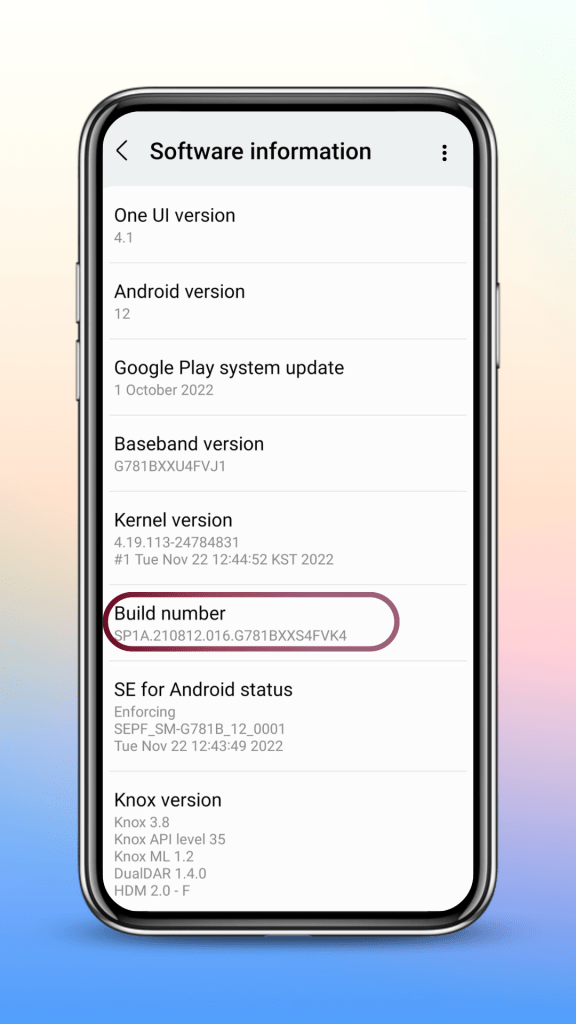
Tap on build number multiple times c. Enable USB debugging by going to developer options.
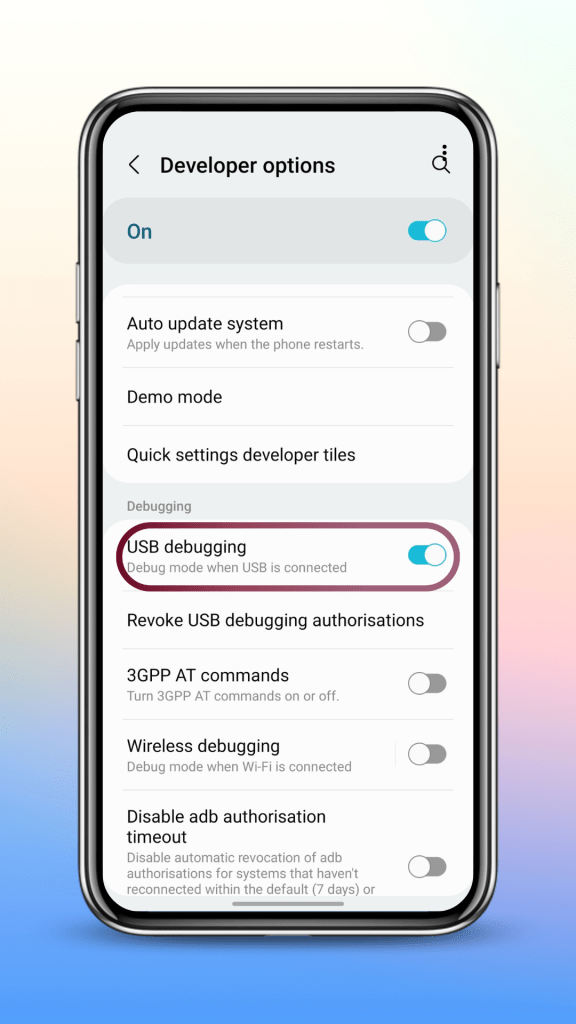
Enable USB debugging d. Connect your phone to the PC and allow all USB permissions in your phone.
e. Now you are ready to use any of the methods mentioned below.
ADB App Control
One of the easiest ways to remove bloatware from any android device and this method requires a PC. You can load and save the presets, install APK files in your phone and manage other important android functions.
IMPORTANT NOTE
This method also requires an additional application known as AC BRIDGE to be installed in your phone. So, when you start this software in your PC, it will ask you to install this application, please go ahead and do that.
Once you are done with debloating, delete AC BRIDGE from your phone.
Xiaomi ADB Tools
The best method to manage Xiaomi devices through ADB and fastboot. This software is not maintained and might not work on the latest Xiaomi devices.
Universal Android Debloater (UAD)
Almost similar to ADB App Control but this gives you the package names of all the applications installed in your phone. It also has a well categorized list of applications to help you with removing Android bloatware.
Platform Tools
If you have the package names of all the applications that you want to remove from you Android device, platform tools can be very helpful. You need to enter the commands manually, so, it might be time-consuming compared to other methods.
ADB-OTG
If you do not have access to a PC, you can debloat one Android phone with another Android phone using a free application called ADB-OTG. This method is similar to platform tools but here you have to enter the commands using your phone.
Debloating Scripts
If you want to remove Android bloatware with just a single click, debloating scripts can be very helpful. These are readymade scripts that contain the list of applications (mostly bloatware) present in Android devices. I got one of the best scripts from GitHub containing most of the popular Android manufacturers, please check the download link below.
NOTE: All the credit goes to developers for making such amazing apps and softwares.
Commands that can be helpful
Check if the phone is connected through ADB mode adb devices
Disable any application pm disable-user –user 0 <package name>
enable any application pm enable –user 0 <package name>
Uninstall any application pm uninstall -k –user 0 <package name>
Replace <package name> with the actual package name of the application
Example: pm uninstall -k –user 0 com.google.android.apps.photos
If you enjoy my work, do consider SUBSCRIBING! Thank you.
-
Project Elixir (Redmi Note 9 Pro & 10 Pro) Android 13: Installation Guide
Before you plan to flash project elixir (or any other custom ROM) in Redmi Note 9 Pro or the 10 Pro, your device bootloader needs to be unlocked and you also need a custom recovery in your phone.
You can watch these 2 videos if you are starting from the scratch.
[Video] Unlocking bootloader in any Xiaomi device
Unlock Bootloader in any Xiaomi Device [Video] Flash a custom recovery (OrangeFox in Redmi Note 9 Pro or TWRP in Redmi Note 10 Pro)
Redmi Note 9 Pro OrangeFox Installation Redmi Note 10 Pro TWRP Installation After you have unlocked your device bootloader and installed a custom recovery, you can follow the steps mentioned below.
Installation Guide For Miatoll (Redmi Note 9 Pro)
1. Use orangefox fbev1 recovery (check the download link below)
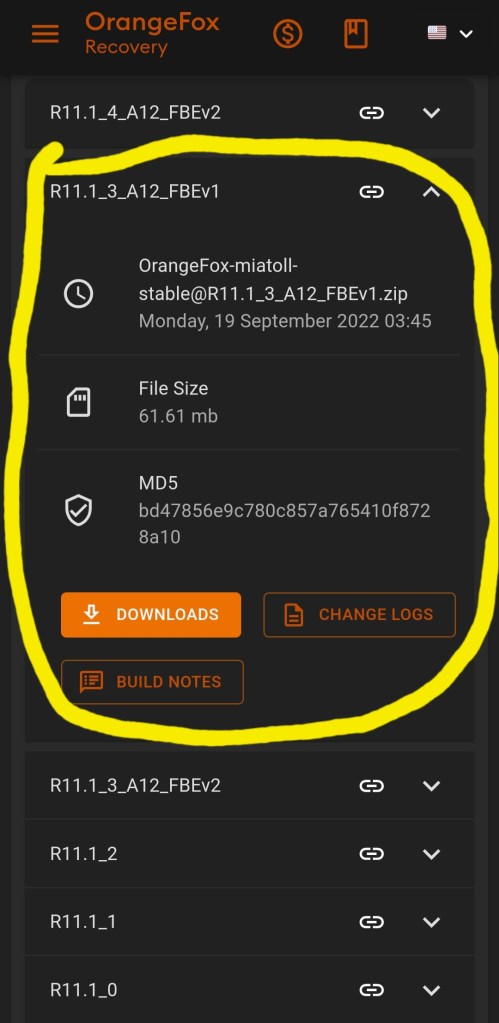
OrangeFox Fbev1 2. Format data (by typing yes)
How to Format Data?Menu > Manage Partitions > Data > Format Data > Type “yes”
3. Flash latest stable Global Firmware
4. Flash rom
5. Reboot to system
Important Links (Click the buttons below)
Installation Guide For Sweet (Redmi Note 10 Pro)
1. Use the latest twrp
2. Flash the ROM
3. Flash GApps (only for Vanilla builds)
4. Format Data (by typing yes)
How to format data?
Wipe > Format Data > Type “yes” & enter
Download Links (Click the buttons below)
If you enjoy my work, do consider subscribing to my YouTube channel by clicking the button below.
-
5 Amazing Android Apps on F-droid | October 2022
Looking for some best opensource applications for your Android device? Below is a list of 5 F-droid apps that are going to be useful.
Click on the application name to get it
GitHub Links
Playstore Links (Only 2 apps are available on playstore)
1. Lunar Launcher (Similar to F-Droid version)
2. E-Ink Bro
My YouTube Video
If you find my work helpful, do consider subscribing to my YouTube channel by clicking the link below.
My F-Droid Playlist

About Me
The sky is not completely dark at night. Were the sky absolutely dark, one would not be able to see the silhouette of an object against the sky.
Follow Me On
Subscribe To My Newsletter
Subscribe for new travel stories and exclusive content.
 TechDoc Blog