If you are planning to remove bloatware from your Android phone, below are some of the best methods that can be helpful.
Before you start with any of the methods mentioned below, follow this guide!
Enable developer options
a. Go to about phone
b. Tap on build number multiple times until you get a banner messages saying that you are a developer now.
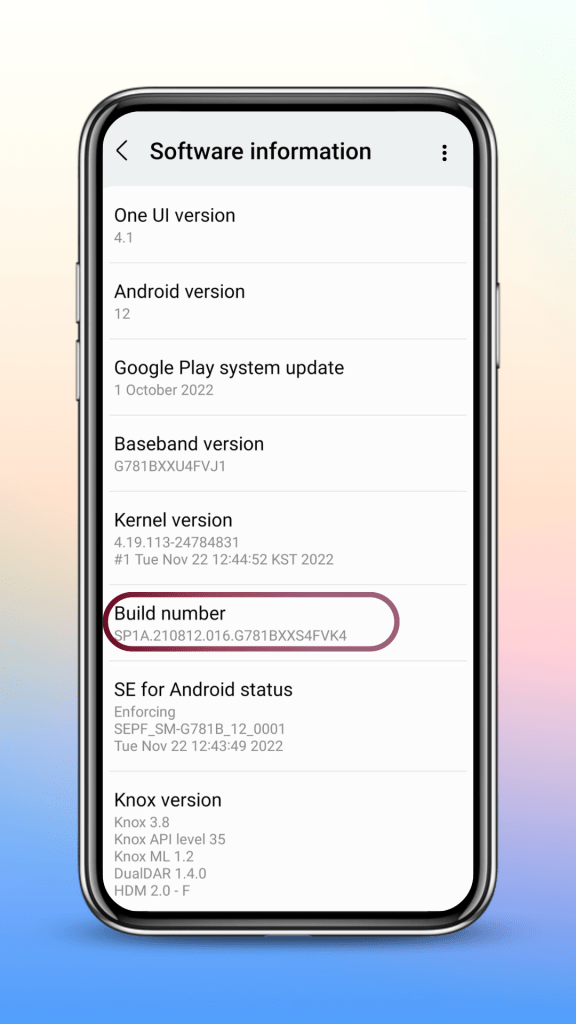
c. Enable USB debugging by going to developer options.
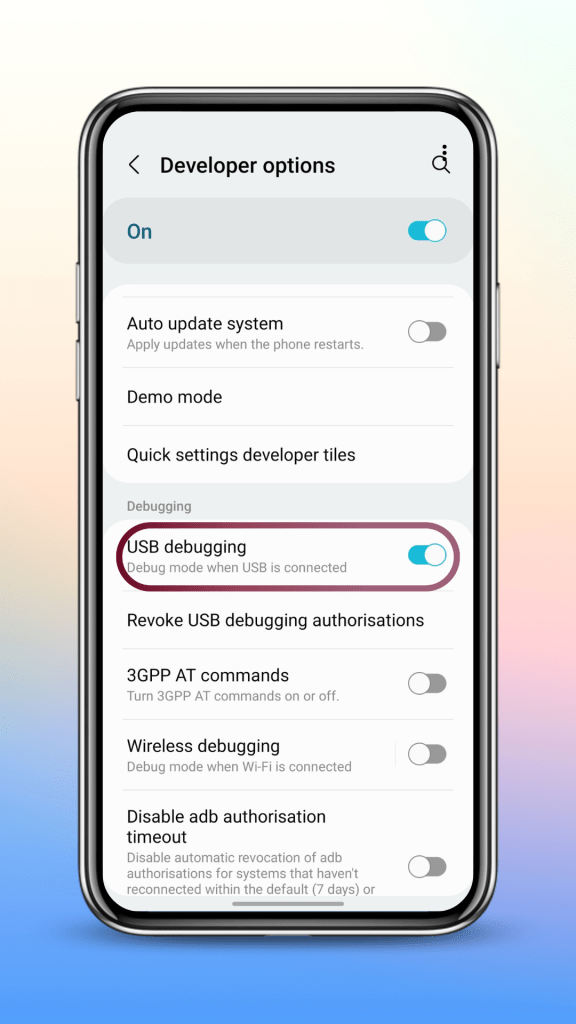
d. Connect your phone to the PC and allow all USB permissions in your phone.
e. Now you are ready to use any of the methods mentioned below.
ADB App Control
One of the easiest ways to remove bloatware from any android device and this method requires a PC. You can load and save the presets, install APK files in your phone and manage other important android functions.
IMPORTANT NOTE
This method also requires an additional application known as AC BRIDGE to be installed in your phone. So, when you start this software in your PC, it will ask you to install this application, please go ahead and do that.
Once you are done with debloating, delete AC BRIDGE from your phone.
Xiaomi ADB Tools
The best method to manage Xiaomi devices through ADB and fastboot. This software is not maintained and might not work on the latest Xiaomi devices.
Universal Android Debloater (UAD)
Almost similar to ADB App Control but this gives you the package names of all the applications installed in your phone. It also has a well categorized list of applications to help you with removing Android bloatware.
Platform Tools
If you have the package names of all the applications that you want to remove from you Android device, platform tools can be very helpful. You need to enter the commands manually, so, it might be time-consuming compared to other methods.
ADB-OTG
If you do not have access to a PC, you can debloat one Android phone with another Android phone using a free application called ADB-OTG. This method is similar to platform tools but here you have to enter the commands using your phone.
Debloating Scripts
If you want to remove Android bloatware with just a single click, debloating scripts can be very helpful. These are readymade scripts that contain the list of applications (mostly bloatware) present in Android devices. I got one of the best scripts from GitHub containing most of the popular Android manufacturers, please check the download link below.
NOTE: All the credit goes to developers for making such amazing apps and softwares.
Commands that can be helpful
Check if the phone is connected through ADB mode adb devices
Disable any application pm disable-user –user 0 <package name>
enable any application pm enable –user 0 <package name>
Uninstall any application pm uninstall -k –user 0 <package name>
Replace <package name> with the actual package name of the application
Example: pm uninstall -k –user 0 com.google.android.apps.photos
If you enjoy my work, do consider SUBSCRIBING! Thank you.
 TechDoc Blog
Leave a comment